Ask questions, share insights, and find product‑specific answers from people building and operating on Equinix.
Recently active
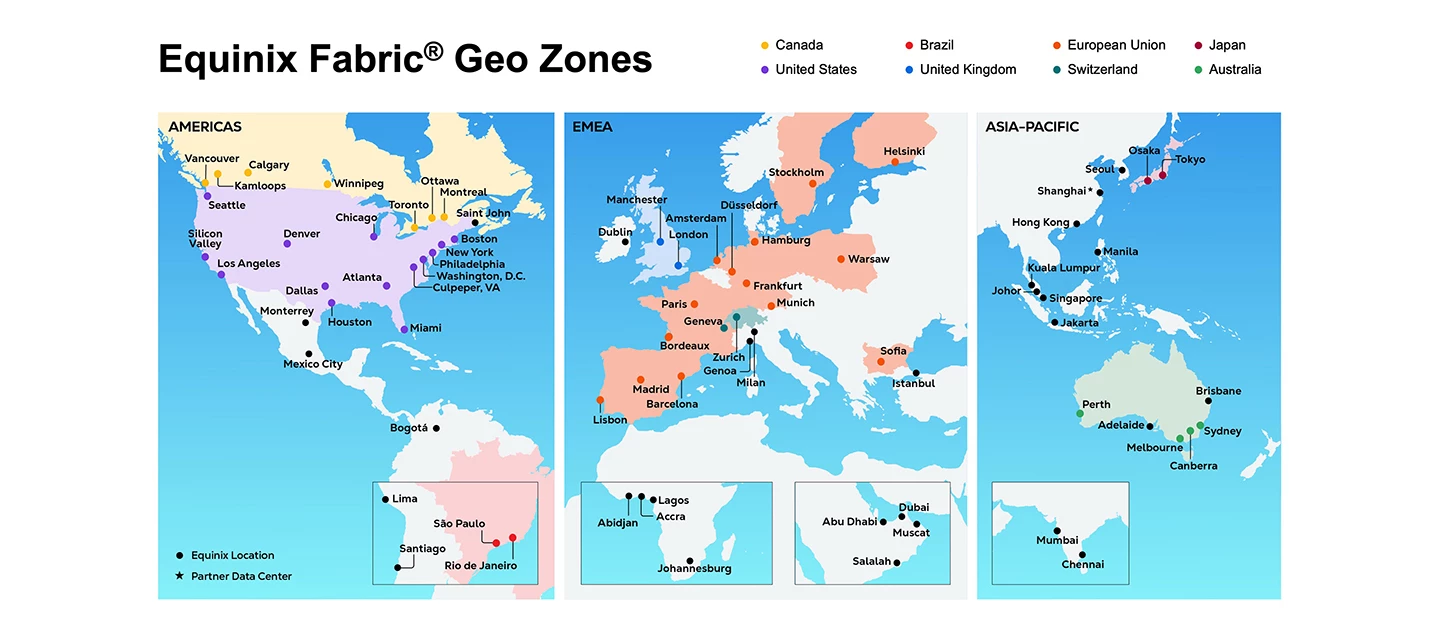
The Challenge:Organizations in government, finance, healthcare, and other regulated industries must ensure sensitive traffic remains within specific jurisdictions and complies with applicable regulations. This challenge extends beyond where data is stored to how network traffic moves between locations, clouds, and applications.Today, customers often rely on public internet routes or cloud service provider backbones that do not provide deterministic routing evidence or granular control over where traffic traverses. This can create trade-offs between compliance requirements and operational flexibility.A Better Approach:Now generally available, Fabric Geo Zones enables customers to enforce geographic routing boundaries for network traffic. Customers apply policy-based routing controls, such as keeping traffic within a specific country or region, helping support sovereignty and compliance requirements.Fabric Geo Zones is delivered through new Fabric virtual connections that include soverei
The Fabric Marketplace Provider Dashboard introduces provider health insights, including port utilization, inventory, and connected customers visibility, helping providers monitor and manage marketplace performance.What’s New:New provider dashboard available within Fabric Marketplace Displays provider health insights, including port utilization and inventory Provides visibility into connected customers and marketplace performanceWhy it Matters: Helps providers monitor the health and performance of their marketplace offerings Provides visibility into utilization, inventory, and customer connectivity to support ongoing managementLearn More Explore Fabric Marketplace
The Challenge:Organizations increasingly rely on cloud services and hybrid multicloud architectures, but achieving reliable, high-performance connectivity to cloud providers can be complex. Establishing direct peering relationships often requires specialized networking expertise and ongoing operational management.Many organizations need a simpler way to access Google services with enterprise-grade performance and reliability, without managing peering relationships themselves.A Better Approach:Equinix Internet Access (EIA) is now a Google Gold Verified Peering Provider, enabling customers to access Google connectivity through an approved provider rather than managing a direct peering relationship themselves.This approach gives customers a private, off-internet peering path from EIA to Google’s public services – provisioned and operated by EIA, so customers don’t have to qualify for or manage Direct Peering themselves.When to Use This:When connecting to Google services and seeking a simp
Online IP Block Management gives EIA customers the ability to independently purchase and manage Internet IP Blocks — directly in the portal, on their own timeline.What’s New:Customers can independently manage Internet IP Blocks associated with EIA services IP Block lifecycle management is now decoupled from EIA service fulfillment Customers can retain and reuse Internet IP Blocks across different EIA services as business needs evolveWhy it Matters:Gives customers greater control over Internet IP Block lifecycle management Decouples IP Block management from EIA service fulfillment, providing more flexibility in IP address planning Allows customers to retain and reuse IP Blocks even when an associated EIA service is terminated Enables self-service management directly in the portal, reducing dependency on manual processes or support requestsLearn MoreEquinix Documentation - EIA
Network Edge now includes Palo Alto Networks Prisma AIRS, a marketplace offering designed to help protect AI workloads through real-time AI security and policy enforcement.What’s New:Palo Alto Networks Prisma AIRS is now available through the Network Edge marketplace Introduces real-time AI security capabilities for AI workloads Provides policy enforcement designed to help reduce threats and prevent data leakageWhy it Matters:Helps organizations protect AI workloads Provides security and policy enforcement capabilities through the Network Edge marketplaceLearn MoreNetwork Edge Documentation Securing AI workloads with Equinix and Palo Alto Networks Equinix Unveils the Distributed AI Hub to Simplify and Secure Enterprise AI Infrastructure
Network Edge has expanded into Kamloops, British Columbia, giving customers in Western Canada a closer deployment option for virtual network services.What’s New:Network Edge now available in Kamloops, British ColumbiaWhy it Matters:Reduces latency for customers deploying virtual network services closer to end users in Western Canada Supports regional deployment consistency for organizations with infrastructure or compliance requirements tied to British ColumbiaLearn MoreNetwork Edge Release Notes | Equinix Product Documentation
Summary:100 Gbps virtual circuit availability on Equinix Fabric has expanded to Los Angeles, supporting high-throughput workloads in the region.What’s New:100G virtual connections now available in Los AngelesWhy it Matters:Gives customers in Los Angeles access to high-throughput connectivity without needing to route through other locations Supports demanding workloads that require 100 Gbps capacity closer to where infrastructure is deployedLearn More:Equinix Fabric Release Notes | Equinix Product Documentation
We are excited to announce a significant architectural evolution in our sovereignty controls. While geo-boundary enforcement has historically resided at the Fabric port level, we have successfully extended this capability down to the Network Edge virtual device itself. This upgrade empowers customers to define and enforce Geo Zones when the Network Edge is the originating endpoint of a Fabric connection. You can now provision and validate this constraint directly via the UI or API, ensuring compatibility checks run before provisioning commits. This proactive validation removes the risk of post-deployment configuration mismatches. This feature is live today across GCP, AWS, and Oracle Quick Connect, supporting both VD-to-Port and VD-to-CSP provisioning paths. (A note for your integration specialists: The API layer for this specific implementation is delivered by the Fabric team.)
Summary:Fabric Geo Zones now extends to the European Union, enabling customers to create secure port-to-port connections across qualifying EU metros with traffic constrained to EU sovereign boundaries.What’s New:EU Geo Zone now available, supporting port-to-port connections between qualifying EU metros including Paris, Frankfurt, Amsterdam, Madrid, Lisbon, Stockholm, and Helsinki Customers can optionally enforce EU-only routing to ensure all traffic stays within EU infrastructure Available via UI and API, supporting EPL, EVPL connections and connections to Service ProvidersWhy it Matters:Enables organizations in regulated industries – including government agencies and enterprises with AI workloads – to meet EU data sovereignty and regulatory requirements like GDPR directly within Fabric Removes the need for bespoke network engineering to enforce EU-only routing across multicloud and partner ecosystemsLearn More:Docs Fabric Geo Zones Demo Fabric Geo Zones Press Release The EU Data Sover
How do I connect my organization’s AWS account to Equinix. What information and steps are required from our side?
Fabric now supports 100G virtual connections in Miami, enabling higher-capacity connectivity for customers in this metro.What’s New:100G virtual connections now available in Miami Increases maximum bandwidth capacity for Fabric in this locationWhy it Matters:Enables high-throughput, performance-sensitive workloads with fewer connections Benefits customers in or connecting through Miami needing greater bandwidthLearn More:Equinix Fabric Release Notes | Equinix Product Documentation
Equinix Managed Solutions has expanded into Los Angeles, bringing managed solutions availability to the US West Coast.What’s New:Equinix Managed Solutions now available in Los AngelesWhy it Matters:Extends managed solutions availability to customers on the U.S. West CoastLearn MoreManaged IT Services for the Managed Data Center | Equinix
The Challenge:Customers in regulated industries must prove that sensitive traffic stays within specific jurisdictions – not just where data is stored, but where packets travel. For teams running virtual network services on Network Edge, this has meant relying on approaches that lack deterministic routing control or fine-grained egress enforcement, forcing trade-offs between performance and compliance.A Better Approach:Fabric Geo Zones now extends to Network Edge connections, enabling customers to apply geographic boundaries directly to Network Edge ports:Keeps Fabric network traffic within defined sovereign boundaries for Network Edge ports Allows additional endpoints to operate within geo-defined data zones Extends policy-based, jurisdiction-constrained routing to virtual network services at the edge – without adding routing complexityWhen to Use This:When deploying Network Edge services that must stay within sovereign or compliance-defined geographic boundaries When extending data so
Fabric now includes a native Insights Hub dashboard in the Fabric Portal, giving customers real-time, unified visibility into network performance and health without relying on external tools or customer integrations.What’s New:Native events and alerts dashboard now available directly in the Fabric PortalWhy it Matters:Network and operations teams can monitor, troubleshoot, and understand their Fabric environment faster – without needing to build or maintain custom integrations Reduces dependence on external observability tools by bringing network health visibility natively into FabricLearn More:Docs Fabric Insights Demo Fabric Intelligence Whitepaper Omdia Analyst Paper
What’s New: EMS Managed Private Storage Block/File Summary:EMS Managed Private Storage Block/File 1.1 expands managed private storage with Network Attached Storage (NAS) and block modalities, along with built-in replication to improve performance, resiliency, and data protection. What’s New:Expanded managed private storage to include NAS and block modalities Added built-in replication capabilities Enhancements aimed at improving performance, resiliency, and data protectionWhy it Matters: Provides improved performance, resiliency, and data protection for storage workloads Benefits customers leveraging managed private storage who require enhanced storage capabilitiesLearn MoreDocumentation - Managed Solutions
Summary:Network Edge has expanded into Johannesburg, giving customers in South Africa a closer deployment option for virtual network services. What’s New:Network Edge now available in Johannesburg, South Africa Why it Matters: Reduces latency for customers deploying virtual network services closer to end users in South Africa Supports regional deployment consistency for organizations with infrastructure or compliance requirements tied to South Africa Learn MoreNetwork Edge technical documentation
Is there a catalog of cross-connect service providers available for each Equinix location? I would like to find out if Equinix offers cross-connect capability with the Bloomberg IGN network from Ashburn and Chicago locations.
The Challenge: As organizations scale across regions and clouds, ensuring that sensitive data stays within specific geographic or jurisdictional boundaries becomes increasingly complex. Today, teams often struggle to:Prove that data-in-motion stays within required jurisdictions (not just where it’s stored) Enforce deterministic routing paths across multicloud and partner ecosystems Meet regulatory requirements like GDPR, DORA, or healthcare and government policies Existing approaches often rely on public internet routing, cloud provider backbones, or custom-built architecture that could lack control, forcing tradeoffs between performance, compliance, and operational complexity. A Better Approach: Fabric Geo Zones (Preview) introduces a new way to define and validate geographic traffic boundaries directly within Equinix Fabric. Enables policy-based, jurisdiction-constrained routing (e.g., USA-only, EU-only) Introduces Network Zones to control how and where traffic flows Provides
We’re rolling out a major update designed to give you more control, deeper visibility, and fewer infrastructure headaches. We’ve officially added a dedicated 30 GB local logging storage allocation directly to your Fortinet (FTNT) firewalls. This means your device now has a massive, built-in buffer to retain traffic logs, threat logs, event logs, and policy violation records completely on-device.Fortinet Virtual FirewallWhy this matters for you?If you've ever had to hunt down a network issue or investigate a security alert, you know that getting to your logs quickly is everything. In the past, relying solely on external syslog servers or SIEM forwarding could sometimes mean dealing with latency, complex setups, or even temporary gaps in data.By bringing 30 GB of storage directly to the firewall, we're eliminating those hurdles.What you get:Instant Troubleshooting: Access historical log data right from the device the second you need it. No more waiting on external queries. Sharper Forens
I have an FCR connected to one OCI connection and two AWS connections.From AWS to OCI, passing through FCR, I see that AWS is implementing ECMP towards OCI prefixes, as evidenced by the RX traffic on the FCR coming from these two connections.In FCR active routes, I am seeing the same prefixes learned from these two AWS connections.If I look at the contrary (TX) from FCR to AWS (from traffic that originated in OCI), I always see TX to AWS using only one AWS connection, never the other one.Support says that it is not working because OCI has only one connection to FCR.As far as I know, ECMP is implemented hop by hop, and it is a local decision implemented independently at each router (hop) in the network, that is why I do not agree with this statement.For me is the function of FCR implement ECMP in this case for these packets coming from OCI to AWS.
We currently have a copper bandwidth connection at the data center (in a cabient) and are looking to increase the available bandwidth.Could you assist with the steps invovled in ordering?From reading past forums does it involve ordering a new connection?Thanks for your expertise.
The launch of the Equinix Managed Solutions (EMS) portfolio in Mexico marks Equinix’s entry into a completely new market for managed infrastructure services. As the second-largest economy in Latin America, Mexico presents a strategic growth opportunity. It also boasts a large workforce, strong logistics infrastructure, and strategic proximity to the U.S.What's now available?🔹 Managed Private Cloud (MPC) – Dedicated or Flex environments for hybrid cloud infrastructure🔹 Managed Private Firewall (MPF) – Fully managed, secure firewall services🔹 Digital Infrastructure Management (DIM) - ITSM-based management for physical and virtual infrastructure in Equinix IBX data centers.🔹 Plus: Enablement Services and Software LicensingLearn more about our Equinix Managed Solutions offerings here!
We heard you! We’ve streamlined the Equinix Internet Access (EIA) process to make it easier for you to order and manage your services. This initial phase is available exclusively for orders that do not require a signature. We’d love to hear what you think of the new process. Your input will help us make further enhancements to the user interface for everyone. We’re working hard to make the improvements you need and want. Please comment on the success page or share your feedback via ideas.
Amazon Web Services (AWS) Customers can now order virtual connections with bandwidths up to 25 Gbps in the following metros: Istanbul, Turkey (IL) Lisbon, Portugal (LS) Equinix and AWS have enabled 25 Gbps (the highest hosted connection tier available) in 27 of the 41 Equinix Fabric metros with local AWS Direct Connect on-ramps. Get Started with Equinix FabricIf you'd like more information on connecting your business to the cloud, visit our service provider search tool or product documentation site for service availability, feature descriptions, and deployment considerations.
Hi team,When ordering Internet Access over fabric for a redundant connection type, how many sets of additional IPs are provided?For example is it just one set of additional IPs anywhere between /30 to /24?Or as it's a redundant pair do we get two sets of additional IPs e.g. additional IP range 1:anything from /30 to /24additional IP range 2:anything from /30 to /24Thanks
Already have an account? Login
Enter your E-mail address. We'll send you an e-mail with instructions to reset your password.