Ask questions, share insights, and find product‑specific answers from people building and operating on Equinix.
Recently active
The Challenge:Connecting enterprise locations across Europe often requires enterprises to engage infrastructure and network providers separately. Navigating multiple systems and coordinating service availability, pricing, quotes and orders can add complexity, slow deployment and AI adoption, and put growth at risk.A Better Approach:Colt Technology Services (Colt) is now the first European-based provider to integrate its last mile connectivity services with Fabric Marketplace. This strengthened partnership brings together Colt’s extensive network footprint and Equinix Fabric, enabling enterprises to establish secure, end-to-end connectivity from third-party locations, including office buildings and data centers, directly into Equinix facilities.Through the Fabric Marketplace experience, customers can instantly discover Colt services, view pricing, request quotes, and trigger order requests without navigating multiple providers. The integration eliminates manual handoffs, accelerates dep
Customers can now use their own Autonomous System Numbers (ASNs) with Equinix Internet Access (EIA), providing greater flexibility for advanced routing and BGP configurations.What’s New:Support for customer-owned ASNs with Equinix Internet Access Greater flexibility for advanced routing and BGP use cases Simplified integration with existing customer network architecturesWhy it Matters:Enables customers to maintain consistent routing policies across their network environments Supports more advanced networking and BGP deployment scenarios Provides increased control and flexibility when connecting to the internet through EIALearn MoreDocumentation - EIA
The Challenge:Organizations extending connectivity between Equinix and branch locations, retail sites, factories, or other edge environments often need to source last-mile services from multiple local providers. Comparing coverage, pricing, lead times, and service options across different markets can be time-consuming and operationally complex, particularly when managing deployments across multiple countries.A Better Approach:GNX is now available through Fabric Marketplace, giving customers access to GNX+, an automated, carrier-neutral platform for sourcing and managing last-mile connectivity. Customers can compare provider options, request quotes, place orders, and manage services through a centralized experience.With access to more than 3,000 network service providers across 190+ countries, GNX helps simplify the process of extending Equinix Fabric connectivity to enterprise locations around the world. By bringing provider discovery, quoting, ordering, and lifecycle management togeth
Equinix Fabric has expanded high-capacity connectivity capabilities in Hong Kong, Osaka, Singapore, and Tokyo with the availability of 100Gbps Virtual Circuits (VCs) and 400G ports, enabling customers to support larger bandwidth requirements and scale their connectivity more efficiently.What’s New:100 Gbps Virtual Circuits are now available in the Hong Kong, Osaka, Singapore, and Tokyo metros 400G ports are now available in the same metros, providing additional capacity to support higher-bandwidth Fabric deploymentsWhy it Matters:Customers can support growing bandwidth demands across cloud, partner, and distributed digital infrastructure environments The combination of 100 Gbps Virtual Circuits and 400G ports provides greater flexibility to scale connectivity as business requirements growLearn MoreReach out to your sales rep to understand the ordering process Equinix Documentation - Fabric
Equinix is pleased to announce the publication of a new commissioned Forrester Consulting Total Economic Impact™ (TEI) of Equinix Networking Solutions. The study examines the potential business value organizations can realize by leveraging Equinix Networking Solutions, including Equinix Fabric®, Fabric Cloud Router, and Network Edge.Based on interviews with customers using Equinix Networking Solutions, Forrester found that a composite organization achieved a 190% return on investment (ROI), $2.1 million net present value (NPV), and $3.1 million in risk-adjusted present value benefits over three years.Why it MattersAs cloud adoption accelerates and AI workloads become increasingly distributed across clouds, enterprise environments, partners, and sovereign regions, organizations face growing networking complexity. Traditional networking approaches built around dedicated circuits, physical infrastructure, and lengthy provisioning cycles often struggle to deliver the agility, scalability,
Equinix Fabric is now available in Lagos, Nigeria, expanding Equinix’s interconnection footprint and enabling customers to access Fabric services from an additional metro, marking Lagos as the 67th Equinix metro.What’s New:Equinix Fabric service has been extended into Lagos, Nigeria Customers can now leverage Fabric from the Lagos metro to connect with distributed infrastructure, cloud providers, partners, and services Supports bandwidths up to 50 GbpsWhy it Matters:Expands access to Equinix Fabric in a new metro, providing customers with additional connectivity options Enables organizations operating in or expanding into the region to leverage Equinix Fabric as part of their interconnection strategyLearn MoreDocumentation - Fabric
Equinix Internet Access (EIA) is now available in Lagos, Nigeria, expanding service availability and providing customers with additional connectivity options in the region.What’s New:Equinix Internet Access is now available in Lagos, Nigeria Customers can leverage EIA services in Lagos to support their connectivity requirementsWhy it Matters:Expands EIA coverage into an additional metro, providing customers with more location options Helps organizations access internet connectivity services from the Lagos location to support their network and business needsLearn MoreEquinix Documentation - EIA
The Fabric MCP (Model Context Protocol) server now includes Network Edge tools that allow AI assistants and developer tools to search for and view Network Edge resources through the Equinix Fabric API. This enhancement enables users to access Network Edge information without writing code, expanding the Fabric MCP server’s capabilities across Equinix Digital Infrastructure.What’s New:Added Network Edge tools to the Fabric MCP server, enabling AI assistants and developer tools to search for and view Network Edge resources through the Equinix Fabric API Enables access to Network Edge information without requiring users to write code Expands the Fabric MCP server’s functionality beyond Fabric resources, creating a more comprehensive interface for interacting with Equinix Digital InfrastructureWhy it Matters:Simplifies access to Network Edge resources by allowing users to retrieve information through AI-powered workflows instead of custom code Improves the developer and user experience by p
The Challenge:As application traffic increases, organizations need an effective way to distribute incoming client requests across backend applications or database servers. Without intelligent traffic distribution, individual servers can become overloaded, potentially affecting application performance and scalability.A Better Approach:F5 BIG-IP Virtual Edition (VE) on Network Edge supports the Local Traffic Manager (LTM) use case, enabling organizations to intelligently distribute incoming traffic across pools of backend application or database servers. This virtualized approach helps organizations manage application traffic and support scalable application delivery without deploying dedicated physical appliances.When to Use This:Distributing incoming client traffic across multiple backend applications or database servers hosted in Equinix colocation facilities, public clouds, or hybrid multi-cloud environments Balancing application workloads to reduce the risk of individual servers bec
The Challenge:As application traffic volumes increase, organizations may outgrow existing connectivity capacity between their virtual network functions (VNFs) and internet access services. Limited bandwidth can create bottlenecks for high-throughput workloads, impacting performance and scalability.A Better Approach:Network Edge now supports 25 Gbps virtual connections to Equinix Internet Access (EIA), enabling customers to provision higher-bandwidth connectivity between supported virtual network functions and internet access services. This enhancement helps organizations accommodate greater traffic demands while reducing potential bandwidth constraints.When to Use This:Supporting high-throughput internet-bound workloads that require more than 10 Gbps of connectivity Scaling network capacity to accommodate growing application and data traffic demands Reducing bandwidth bottlenecks between Network Edge virtual network functions and Equinix Internet Access (EIA) Improving connectivity cap
Fabric Insights now provides network maintenance, incident, and repair notifications directly within the service, helping customers stay informed about Fabric events sand respond more efficiently.What’s New:View network maintenance, incident, and repair notifications directly within Fabric Insights Access operational updates in the same location where Fabric health and performance are monitored Stay informed of relevant Fabric events without relying on separate communications channelsWhy it Matters:Improves visibility into maintenance and service-impacting events affecting Fabric resources Helps teams identify, assess, and respond to operational events more efficiently Centralizes monitoring and operational notifications within a single Fabric Insights experienceLearn More Accessing Fabric Insights Dashboard
100 Gbps virtual circuit availability on Equinix Fabric has expanded to Silicon Valley, supporting high-throughput workloads in the region.What’s New:100G virtual connections now available in Silicon ValleyWhy it Matters:Enables customers to move large volumes of data between distributed infrastructure, clouds, and service providers at higher speeds. Supports bandwidth-intensive use cases such as AI, data replication and large-scale cloud connectivity. Expands customers’ ability to establish 100 Gbps connectivity across eight major U.S. metros, including key East Coast, Central and West Coast markets.Learn More:Equinix Fabric Release Notes | Equinix Product Documentation
Equinix introduces Equinix® Fabric One™ an intent-based networking service designed to simplify any-to-any connectivity across distributed digital infrastructure. Fabric One introduces a new way for customers to describe the outcome they need, while Equinix composes the network required to deliver it.Note: Equinix Fabric One was introduced at Equinix Horizon alongside Equinix Inference Exchange, together delivering new capabilities that solidify Equinix’s role as the world’s trusted AI exchange. Fabric One is expected to enter preview in Q4 2026, with planned general availability in Q1 2027 Additional details regarding availability, deployment locations, and customer access will be shared in future updates.Why it MattersModern enterprises operate across clouds, AI providers, enterprise infrastructure, partners, and sovereign environments. As these environments become more distributed, connectivity can become increasingly complex to design, configure, and manage.Fabric One is designed t
Fabric Insights now provides expanded observability capabilities for both Last Mile as a Service (LMaaS) and IP Blocks. These enhancements give customers and service providers greater visibility into operational activity through event streaming and project-level observability, helping support monitoring, troubleshooting, and workflow automation.What’s New:Fabric Insights now supports LMaaS service profile events, enabling service providers to receive and retrieve incoming connection requests through streaming for near real-time visibility Service providers can incorporate LMaaS connection request events into existing observability and operational workflows Fabric Insights now includes support for IP Block lifecycle and operational events within project-level observability IP Block activity can be viewed alongside other Fabric resource events through a unified observability experience Customers can integrate both LMaaS and IP Block events into existing monitoring, troubleshooting, and a
The Challenge:Organizations expanding into new markets often need connectivity to edge locations and third-party data centers beyond the native reach of their existing network infrastructure. Finding local providers and coordinating services across multiple countries can add complexity and delay deployment.As connectivity needs grow, customers benefit from a simpler way to identify providers with broad geographic reach and initiate connectivity services through a centralized experience.A Better Approach:Zenlayer is now available through Fabric Marketplace as a provider of Last Mile as a Service (LMaaS), enabling customers to discover coverage, request quotes, submit order requests and connect to Zenlayer’s network through the same experience used to access Fabric services.With more than 300 points of presence across 50 countries, Zenlayer provides extensive connectivity coverage, particularly across Southeast Asia, China, the Middle East, and Central and South Africa. This reach helps
The Challenge:Organizations evaluating networking, security, AI, and other digital infrastructure solutions often need to identify potential ecosystem participants before making deployment decisions. However, discovering available providers and partners can be more difficult when access isn’t openly available.Customers and prospective customers can benefit from a simpler way to explore ecosystem participants and understand the available provider landscape before engaging further with Equinix solutions.A Better Approach:Fabric Marketplace is now accessible publicly through Equinix.com, enabling broader discovery of Equinix ecosystem participants. It includes nearly 800 service providers, making it easier to discover and connect with participants through a single experience.By making Fabric Marketplace externally accessible, users can search for providers, explore AI and Network hubs, view company and service profiles, and learn more about available services before deciding how to connec
When connecting more ExpressRoute circuits into our Equinix Network Edge, does the region of the Azure ExpressRoute matter?For example, if we have an existing ExpressRoute in Azure CentralUS peered with Equinix Network Edge in Chicago and wanted to add another ExpressRoute out of Azure West. Can it also be peered with our existing Network Edge Cisco 8000Vs in Chicago?
Fabric Insights now enables streaming of Network Edge device interface performance metrics and alerts, allowing customers to monitor interface health through their existing observability platforms.What’s New:Fabric Insights now supports streaming Network Edge device interface performance metrics Customers can integrate interface metrics and alerts with existing observability tools and monitoring platforms Streaming telemetry provides visibility into Network Edge interface health alongside other operational monitoring dataWhy it Matters:Helps operations teams monitor Network Edge interface health using the tools and workflows they already use Enables faster detection and investigation of network issues through centralized observability platforms Supports organizations seeking greater visibility into network performance across their Equinix networking servicesLearn MoreDocumentation - Network Edge Documentation - Fabric Insights Dashboard
Fabric Insights now enables users to download on-demand event logs for Fabric assets, providing exportable historical records to support troubleshooting, compliance, auditing, and operational investigations.What’s New:Users can download on-demand event logs for Fabric assets directly from Fabric Insights Event log exports provide historical records of asset activity and events Fabric Insights now supports downloads of both network performance reports and event logs from the portalWhy it Matters:Simplifies troubleshooting by providing access to historical event data for operational investigations Helps network operations and security teams maintain records for compliance and audit requirements Makes it easier to analyze and share Fabric asset activity without manually collecting event historyLearn MoreDocumentation - Fabric Documentation - Fabric Insights Dashboard
The Challenge:Organizations deploying AI infrastructure often need ongoing operational support after initial deployment. Managing AI environments can require specialized expertise, and customers may want flexibility in how they source their AI Factory hardware while still benefitting from managed services.A Better Approach:Equinix Managed Solutions has expanded Managed AI Factory to support Dell AI Factory day-2 support and management. This gives customers an additional hardware choice when deploying AI Factories with Equinix while maintaining access to managed operational services.Dell AI Factory reference architectures can also support smaller deployment footprints than NVIDIA SuperPod scalable units, enabling managed AI deployments that fit a wider range of infrastructure requirements.When to Use This:When deploying a Dell AI Factory and seeking day-2 operational support and management from Equinix Managed Solutions When looking for greater flexibility in selecting AI Factory hardwa
Network Edge now provides visibility into the operational status of virtual network functions (VNFs), helping users understand the current runtime condition of their deployed services.What’s New:Operational status indicates the current runtime condition of a VNF Status visibility includes whether a VNF is actively processing traffic, suspended, powered off, or experiencing an error condition Users can view the current operational state of deployed VNFsWhy it Matters:Provides greater visibility into the runtime condition of VNFs Helps users quickly understand whether a VNF is actively operating or may require attention Supports day-to-day operational awareness within Network Edge environmentsLearn MoreDocumentation - Network Edge
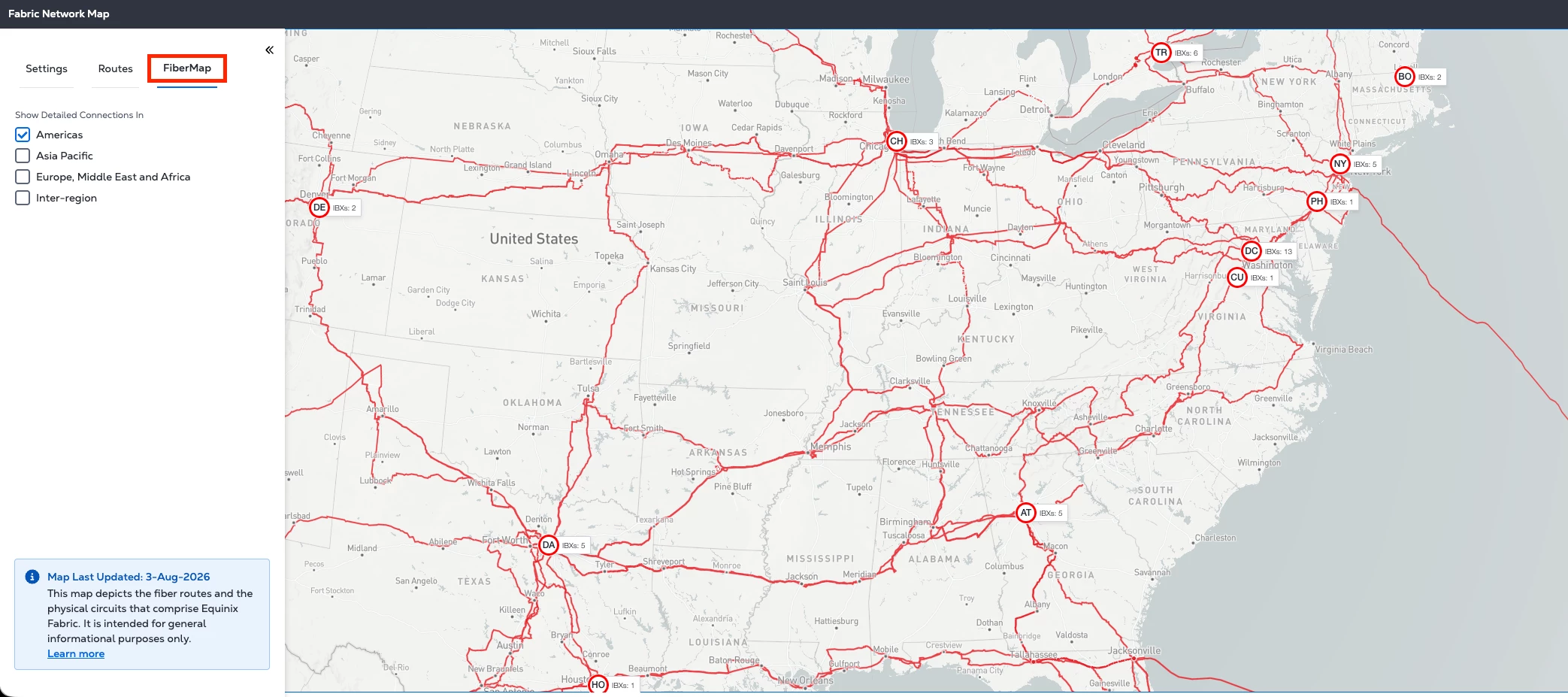
Customers can now gain greater visibility into the physical infrastructure supporting Equinix Fabric through the Fabric Network Map tool in Equinix Customer Portal. By selecting the new FiberMap tab, customers can select one or more regions to view the physical circuits and IBX locations that support Fabric services, helping them better understand the fiber paths underlying their connectivity.What’s New:View the underlying fiber paths used by the Equinix Fabric physical underlay network Toggle between the existing high-level network view and a more detailed fiber path view Visualize multiple individual fiber paths across network segmentsWhy it Matters:Provides additional visibility into the underlying network infrastructure Helps customers better understand network resiliency by viewing the fiber paths supporting Fabric connectivity Benefits Fabric users who want greater insight into the physical paths underlying their network connectionsLearn MoreDocumentation - FiberMap
Netskope Private Access (NPA) is now available on Network Edge, providing a new VPN offering that enables customers to securely manage access to their corporate resources.What’s New:Netskope Private Access (NPA) is now available on Network Edge Introduces a new VPN offering within the Network Edge marketplace Enables customers to securely manage access to their corporate resourcesWhy it Matters:Provides an additional secure access option through the Network Edge marketplace Supports organizations that need to manage access to corporate resources securelyLearn MoreEquinix Documentation - Network Edge
Following the successful launch in California, where SHRED expanded to San Jose, Santa Clara, and Palo Alto IBXs, we're excited to announce the next phase of our rollout across EMEA. This significantly increases our coverage and brings secure, sustainable e-waste disposal services to even more customers across the region.We are now launching SHRED (Smart Hands for Responsible Electronic Disposal) in the following IBXs:FR2, FR4, FR5, FR6, FR7, FR8, FR13, IL2, IL4, MU1, MU3, MU4, DU1, DX1, DX2, and AD1This expansion strengthens our global footprint and reflects the growing demand for responsible IT asset disposal solutions across our data centers.Simplify IT Asset Disposal While Supporting a Greener FutureWith SHRED, customers can securely and responsibly dispose of retired IT equipment while supporting their sustainability goals. SHRED ensures electronic waste is handled according to the highest standards of security and environmental responsibility.What is SHRED?SHRED is a Smart Hands
Equinix Managed Solutions has expanded into Melbourne and Sydney, extending access to managed private cloud, storage, AI, backup, and enablement services in Australia.What’s New:Equinix Managed Solutions (EMS) is now available in Melbourne Equinix Managed Solutions (EMS) is now available in Sydney Customers can access the EMS portfolio, including managed private cloud, storage, AI, backup, and enablement services, in both metrosWhy it Matters:Expands access to Equinix Managed Solutions for customers operating in Australia Provides managed private cloud, storage, AI, backup, and enablement services in Melbourne and Sydney Helps organizations simplify infrastructure operations by shifting day-to-day management to Equinix Supports cloud, AI, and digital transformation initiatives without requiring customers to build and operate infrastructure themselves Supports requirements for dedicated infrastructure hosted in AustraliaLearn MoreManaged IT Solutions for the Managed Data Center | Equini
Already have an account? Login
Enter your E-mail address. We'll send you an e-mail with instructions to reset your password.