Upcoming Migration: Community.Equinix.com will be read-only from April 7–16 while we move to our new platform. Learn more.
Forum Discussion
Shannon
4 years agoCommunity Manager
How do I Follow a Topic or Page?
I'd like to subscribe to a discussion thread and follow a topic. What's the best way to do this?

- 3 years ago
Subscriptions let you get email updates whenever new content appears in an area of the community that you're interested in. You can follow a page (ideas, discussions, what's new), specific posts (like a discussion or idea you are following), and tags (common keywords you are interested in).
To subscribe to a page or topic
- Go to the page you want to subscribe to.
- Click on the follow notification (bell and plus icon in the top right under profile image)
- Select Follow
To follow a tag
If you are interested in a common topic, you can follow any topics that have that tag applied to it. For example, AI is a popular topic right now.
- Go to the discussions page and select show all on the popular tag widget on the right side of page.
- On the widget, select the tags you are interested in. For example, AI is on this page.
- Select the top right follow button to follow all AI content within Community.
To view and manage your subscriptions:
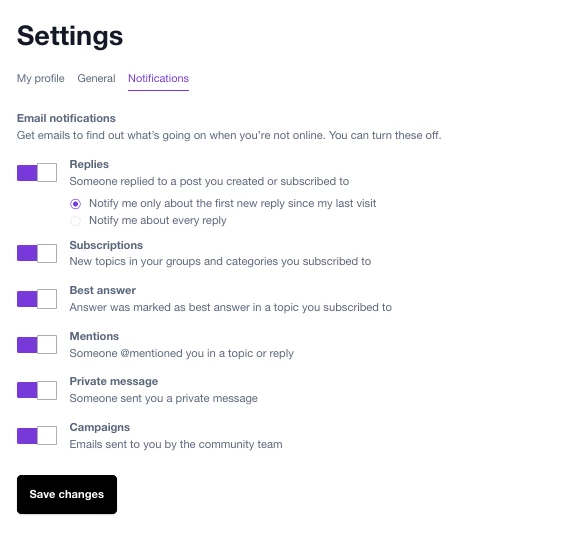
- Select your profile image in the top right of the page
- Go to My Settings > Follow & Notifications.
- Under Follows, you'll see the list of pages and topics you've subscribed to.
You can click a subscription to go to the item. - Under Email Notifications, you can see what settings/frequency you have to receive email communications
- To delete a subscription, click the three dots on the right and click Unfollow.
Shannon
3 years agoCommunity Manager
Subscriptions let you get email updates whenever new content appears in an area of the community that you're interested in. You can follow a page (ideas, discussions, what's new), specific posts (like a discussion or idea you are following), and tags (common keywords you are interested in).
To subscribe to a page or topic
- Go to the page you want to subscribe to.
- Click on the follow notification (bell and plus icon in the top right under profile image)
- Select Follow
To follow a tag
If you are interested in a common topic, you can follow any topics that have that tag applied to it. For example, AI is a popular topic right now.
- Go to the discussions page and select show all on the popular tag widget on the right side of page.
- On the widget, select the tags you are interested in. For example, AI is on this page.
- Select the top right follow button to follow all AI content within Community.
To view and manage your subscriptions:
- Select your profile image in the top right of the page
- Go to My Settings > Follow & Notifications.
- Under Follows, you'll see the list of pages and topics you've subscribed to.
You can click a subscription to go to the item. - Under Email Notifications, you can see what settings/frequency you have to receive email communications
- To delete a subscription, click the three dots on the right and click Unfollow.
Related Content
- 2 years ago
- 2 years ago