
MACsec Replay Window Baseline Calculator: User Guide
Overview
This guide explains each section of the MACsec Replay Protection Window Sizing Calculator and the mathematics behind the recommended window value. The tool produces a baseline planning recommendation, not a hardware-certified value — it estimates how large a replay window is needed to tolerate normal jitter, routing/LAG failover.
Why is the Recommended Window Calculated This Way?
The core design philosophy behind the calculator is that the replay window must be large enough to absorb every legitimate cause of out-of-order packet numbers (PNs) while staying as small as possible to minimize actual security exposure. MACsec's anti-replay mechanism works by tracking a sliding window of recently-seen PNs — any packet with a PN falling outside that window (too far behind the highest PN seen) gets dropped as a suspected replay. This creates a direct trade-off: too small a window causes false-positive drops of legitimate traffic, while too large a window gives a genuine replay attacker more breathing room to succeed.
The jitter component exists because even a single, stable path with no failures does not guarantee packets arrive in the exact order they were transmitted. QoS scheduling, per-hop queuing variance, and ECMP/LAG hashing across parallel links all cause small, natural arrival-time variance. This is normal network behavior, not a fault condition, so the window has to absorb it or MACsec will drop valid traffic on a perfectly healthy link.
The path-switch component models a routing change during a failover event. If a secondary path has a different propagation delay than the primary, packets transmitted right before and right after the route change can arrive interleaved rather than strictly in order, because they are now traveling at different speeds. This is typically the largest and most disruptive component, since failover events tend to introduce far more delay variance than steady-state jitter.
These two components are added together rather than treated separately because, in a real failover scenario, they can realistically overlap — a routing change is often accompanied by transient loss and elevated jitter simultaneously as the network reconverges. Summing them produces a conservative, worst-case-leaning estimate rather than assuming these events happen in isolation. The 1.5x safety margin on top accounts for real-world imperfection in this simplified model — measurement inaccuracy in input values or additional micro-variance not explicitly captured — giving the final number headroom without being wildly oversized.
The result is rounded up to specific configurable values because real hardware does not always accept arbitrary window sizes. Most MACsec implementations expose configuration in specific increments, often powers of two, up to platform-specific maximums such as 2³²−1 for standard ciphers or 2³⁰−1 under XPN. Rounding up to the nearest common value ensures the recommendation maps to something that could realistically be configured, rather than landing on an oddly precise number a vendor implementation might not accept.
Line Rate Section
This section selects the physical port speed (1, 10, 100, or 400 Gbps) used as the basis for every downstream calculation. The physical line rate — not a downstream policed or shaped rate — should always be used, because MACsec packet numbers (PNs) advance at the speed frames are actually serialized onto the wire. If a policer or shaper is applied downstream of the MACsec encryption point, bursts still hit the wire at full physical speed before being clamped, so sizing against a lower policed rate would understate the true packet rate and undersize the window.
The frame size selector determines the total frame size used to compute packets-per-second (pps), which is the multiplier applied to every time-based input (jitter, delay differential, RTT) elsewhere in the tool. Available options include fixed sizes (64B, 128B, 256B, 512B, 1024B, 1280B, 1500B, 9000B jumbo) as well as blended traffic-mix profiles — IMIX (~340B average has been chosen, representing a realistic internet traffic mix) and EMIX (~600B average has been chosen, representing a heavier enterprise traffic mix). Smaller frame sizes produce a higher pps and therefore a larger recommended window, since more packet numbers pass in a given unit of time when frames are small.
The calculator adds standard MACsec, Layer 1 and Layer 2 overhead automatically: a 16-byte SecTAG (32 bytes if Extended Packet Numbering, or XPN, is enabled), a 16-byte Integrity Check Value (ICV), 20 bytes for preamble and interpacket gap, 14-byte Ethernet header + 4-byte FCS. This overhead is applied identically to every frame size option before pps is computed, since the wire actually carries the full frame including this overhead, not just the raw payload size. You can also choose between none, one and two VLAN tags to be included in the pps calculation.
Extended Packet Numbering (XPN)
An optional toggle enables XPN modeling per IEEE 802.1AEbw, which extends the SecTAG from 16 to 32 bytes to support 64-bit packet numbering instead of the standard 32-bit counter. Enabling this slightly increases total frame overhead and lowers packet rate at a given line rate, and it also changes the maximum configurable replay-window ceiling referenced in the results (2³⁰−1 under XPN versus 2³²−1 for standard ciphers).
Primary Path Characteristics Section
Round-trip time (RTT) represents the delay on the primary forwarding path, adjustable between 0.1 ms (100 microseconds) and 500 ms.
Jitter, adjustable between 0 and 3 ms, represents the variance in packet arrival time within a single path caused by QoS prioritization, per-hop queuing differences, or ECMP/LAG load-balancing across multiple physical links. Jitter is the primary driver of legitimate reordering on a stable path — packets can arrive out of packet-number sequence even without any packet loss, and the replay window must tolerate this spread or it will begin discarding valid frames.
Alternate Path Section - (Failover Scenario)
This section models what happens to packet-number sequencing when a routing change shifts traffic from a primary to a secondary path — historically the dominant real-world cause of severe MACsec reordering, since a full path change can introduce a much larger and more sudden delay shift than ordinary jitter.
Selecting "secondary path = same latency as primary" assumes a routing or LAG hashing change introduces no meaningful delay differential, so this component contributes zero to the total window. Selecting "secondary path has different latency" enables a delay differential input, adjustable between 0.1 ms (100 microseconds) and 15 ms, representing how much longer or shorter the secondary path is compared to the primary. This differential is treated as the time window during which packets from the old and new paths could both still be arriving, more or less simultaneously, immediately after a route change.
Bandwidth-Delay Product Section
This section displays the calculated bandwidth-delay product (BDP) — the volume of data that can be in flight on the primary path at any given instant, based on line rate and RTT. It is expressed in bits, bytes, and packets, along with the derived packet rate (pps), each formatted to three decimal places with standard K/M/G suffixes for readability at any line rate. The BDP is primarily informational context here; it illustrates the scale of in-flight traffic the network is carrying, which helps explain why high-speed, high-RTT paths naturally require larger replay windows than short, low-speed links.
Recommended Replay Window Section — Explained
This is the core output of the calculator, built from two independently calculated components that are summed together, then scaled by a 1.5x safety margin, then rounded up to the nearest common configurable value.
Jitter Component

This converts the configured jitter (in seconds) into an equivalent count of packet numbers, representing how many PNs could plausibly be out of sequence at any moment purely due to in-path reordering, independent of any packet loss or route change.
Path-Switch Component

If a different-latency secondary path is selected, this converts the delay differential into an equivalent packet-number count, representing the number of PNs that could be "double-covered" — arriving from both the old and new path near-simultaneously — immediately following a routing change. When the same-latency option is selected, this term is zero.
Subtotal and Safety Margin
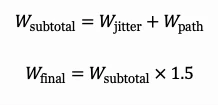
The two components are summed additively, treating them as independent contributors that could both be occurring near-simultaneously (a conservative, worst-case-leaning assumption). The 1.5x safety margin then provides headroom for real-world variability not explicitly modeled — such as measurement imprecision, additional micro-jitter — before the result is rounded up to the nearest power-of-two-style value commonly supported as a configurable replay-window size on networking hardware (for example, 16384, 65536, 131072, up to the 32-bit maximum of 4,294,967,295, or the XPN-cipher ceiling of 2,147,483,647).
Exposure Time Display
Alongside the numeric window, the tool displays the equivalent exposure time — how many milliseconds of traffic the recommended window represents at the configured line rate and frame size. This reframes the abstract packet count into a security-relevant quantity: it shows how narrow the actual time window would be for a replay attacker to intercept, duplicate, and re-inject a captured frame before the sliding window advances past it, which is typically a few milliseconds even for very large window values at high line rates.
Methodology and Assumptions Section
This section documents the underlying modeling choices in condensed form: the additive structure of the two components, the definitions of IMIX and EMIX, the XPN overhead adjustment, the recommendation to always size against physical line rate rather than a policed or shaped rate, and a reminder that the output is a planning baseline requiring verification against the actual configurable replay-window range supported by the specific vendor platform and cipher suite in use (standard ciphers typically support up to 2³²−1, while XPN ciphers cap at 2³⁰−1).