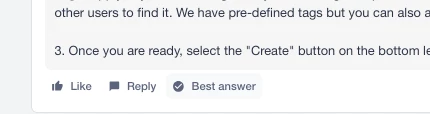
We love to see that solutions are being provided in the community. If you’ve received a solution to your question, please mark it as best answer so it shows that the response helped solve your problem.
Simply follow these steps:
Open the discussion thread containing the replies.
Find the reply you want to mark as the Best Answer.
Look for the “Mark as Best Answer” button or the checkmark icon near the bottom or top-right of that reply. (On some layouts it may appear as a small check icon beside the reply actions.)
Click the “Mark as Best Answer” button. You should see a confirmation message and the reply will be visually highlighted as the accepted/best answer.
Notes and tips:
Only the original post author (the person who asked the question) can mark a reply as the Best Answer. Community moderators may also mark an answer in some situations.
You can change the Best Answer later — simply click the “Mark as Best Answer” on a different reply, or use the “Unmark” option if you want to remove the selection.
If you don’t see the option, make sure you are signed in with the account that posted the question and that the thread is a question-type post (some discussion formats may not support Best Answer voting).
When you mark a Best Answer, it helps other members quickly find the solution and rewards the responder for their contribution.
If you still can’t find the option, reply here with a link to your thread and I’ll help check the settings.
We love to see that solutions are being provided in the community. If you’ve received a solution to your question, please mark it as best answer so it shows that the response helped solve your problem.
Simply follow these steps:
Open the discussion thread containing the replies.
Find the reply you want to mark as the Best Answer.
Look for the “Mark as Best Answer” button or the checkmark icon near the bottom or top-right of that reply. (On some layouts it may appear as a small check icon beside the reply actions.)
Click the “Mark as Best Answer” button. You should see a confirmation message and the reply will be visually highlighted as the accepted/best answer.
Notes and tips:
Only the original post author (the person who asked the question) can mark a reply as the Best Answer. Community moderators may also mark an answer in some situations.
You can change the Best Answer later — simply click the “Mark as Best Answer” on a different reply, or use the “Unmark” option if you want to remove the selection.
If you don’t see the option, make sure you are signed in with the account that posted the question and that the thread is a question-type post (some discussion formats may not support Best Answer voting).
When you mark a Best Answer, it helps other members quickly find the solution and rewards the responder for their contribution.
If you still can’t find the option, reply here with a link to your thread and I’ll help check the settings.