Subscriptions let you get email updates whenever new content appears in an area of the community that you're interested in. You can follow a page (ideas, discussions, what's new) and specific posts (like a discussion or idea you are following).
To subscribe to a page or topic
Go to the page you want to subscribe to.
Click on the follow notification (bell and plus icon in the top right under profile image)
Select Follow
To view and manage your subscriptions:
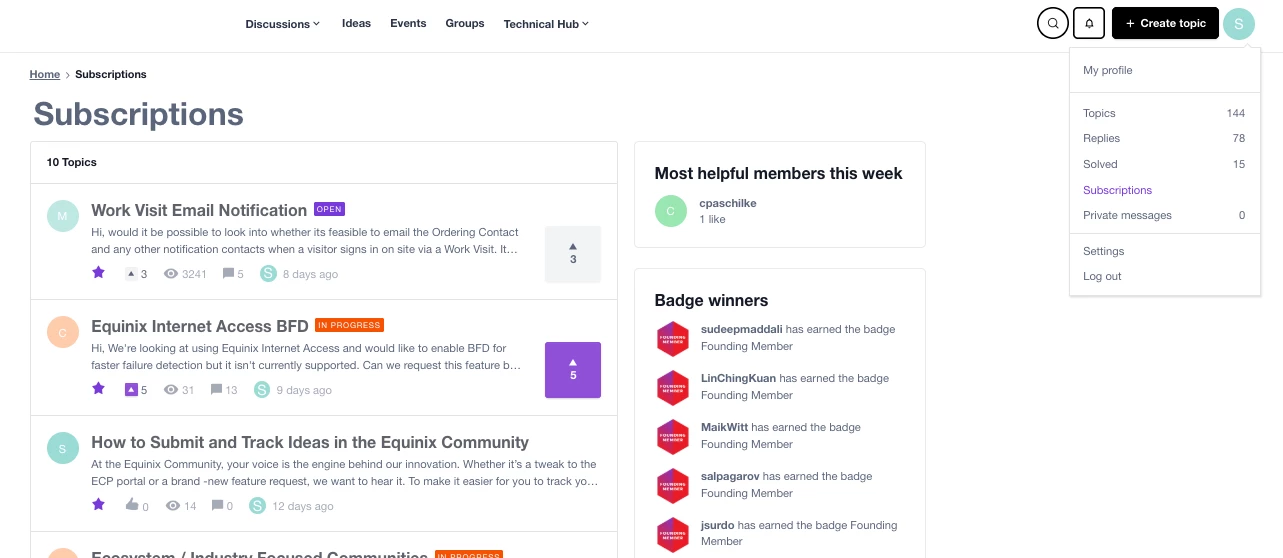
Select your profile image in the top right of the page
Go to Subscriptions
You'll see the list of pages and topics you've subscribed to. You can click a subscription to go to the item.
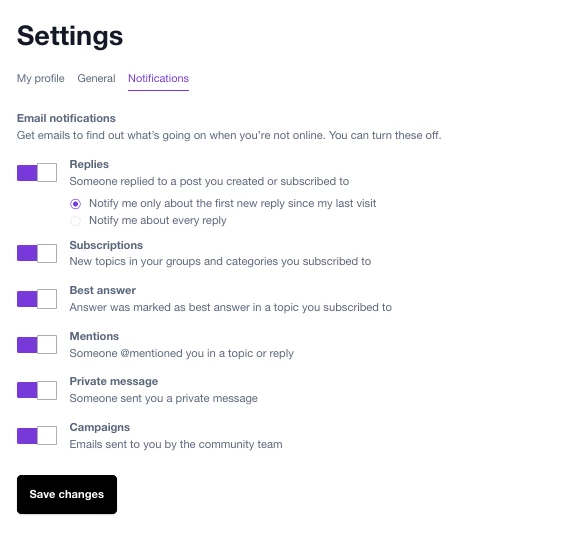
Under Settings, you can view your subscription notifications and turn them on/off.
Subscriptions let you get email updates whenever new content appears in an area of the community that you're interested in. You can follow a page (ideas, discussions, what's new) and specific posts (like a discussion or idea you are following).
To subscribe to a page or topic
Go to the page you want to subscribe to.
Click on the follow notification (bell and plus icon in the top right under profile image)
Select Follow
To view and manage your subscriptions:
Select your profile image in the top right of the page
Go to Subscriptions
You'll see the list of pages and topics you've subscribed to. You can click a subscription to go to the item.
Under Settings, you can view your subscription notifications and turn them on/off.