The easiest way to ask a question of the community is to simply type your question in the Search bar, located in the top right of any Equinix Community page. You might find that another community member has already asked and answered your question. If you don’t find what you are looking for, create a new topic in the community.
How do I post a new discussion or question?
1. Make sure you are logged into the Community
2. Select the “Create Topic” button on top right of navigation.
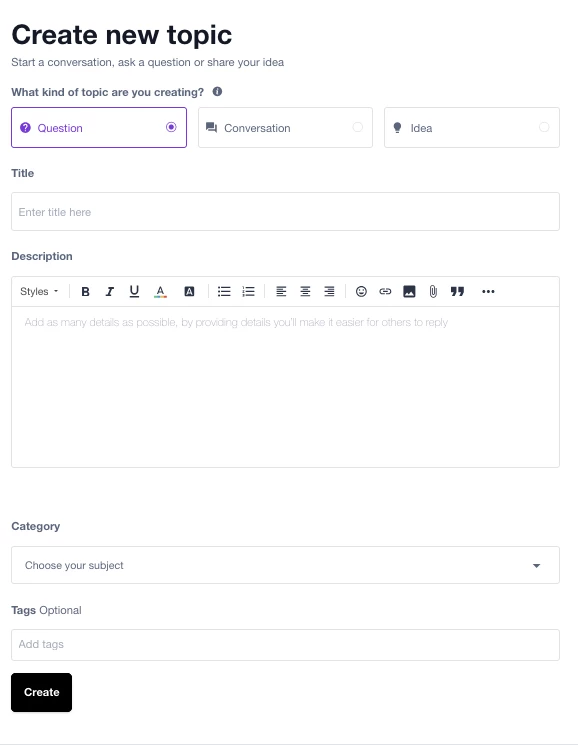
3. You’ll be able to select the type of topic: Question, Conversation, or Idea.
Title: Try to keep this short and direct so that other users will understand what you are asking or posting
Description: This is where you'll want to provide as many details as you can in your question or discussion. If you can include screenshots that is always helpful!
Category: Try to select the location that’s the best fit for it. If you can’t find anything, then include in “all discussions” and we can help move it later.
Tags: Apply any additional tags that you think might help describe the question/discussion for other users to find it. We have pre-defined tags but you can also add your own.
3. Once you are ready, select the "Create" button on the bottom left.
The easiest way to ask a question of the community is to simply type your question in the Search bar, located in the top right of any Equinix Community page. You might find that another community member has already asked and answered your question. If you don’t find what you are looking for, create a new topic in the community.
How do I post a new discussion or question?
1. Make sure you are logged into the Community
2. Select the “Create Topic” button on top right of navigation.
3. You’ll be able to select the type of topic: Question, Conversation, or Idea.
Title: Try to keep this short and direct so that other users will understand what you are asking or posting
Description: This is where you'll want to provide as many details as you can in your question or discussion. If you can include screenshots that is always helpful!
Category: Try to select the location that’s the best fit for it. If you can’t find anything, then include in “all discussions” and we can help move it later.
Tags: Apply any additional tags that you think might help describe the question/discussion for other users to find it. We have pre-defined tags but you can also add your own.
3. Once you are ready, select the "Create" button on the bottom left.