Upcoming Migration: Community.Equinix.com will be read-only from April 7–16 while we move to our new platform. Learn more.
internet access
18 TopicsShare your experience with Equinix Internet Access to inform 2025 product strategy
We have a great opportunity for you to share your experience with internet access. We need your input! Your valuable insights will directly influence our planning for 2025 as we work towards enhancing your internet access experience. We want to make sure we address your pain points, cater to your needs, and improve the overall purchasing experience. Interested in taking part in this 5-minute survey activity? Fill out survey below or click here to submit your feedback! Once you complete the activity, you’ll have the opportunity to sign up today for the Equinix Customer Insights Panel. Influence new ideas, processes, product releases, capabilities, and more through engaging research activities like this one! Join, shape, influence, and innovate today!547Views9likes0CommentsTech Note: Using BGP Local-AS with Equinix Internet Access over Fabric (EIAoF) and Network Edge
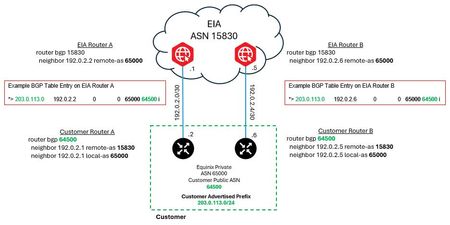
Welcome to the Equinix Community! We know you’re always looking for ways to maximize your connectivity, and sometimes technical limitations can be a hurdle. This post dives into a handy BGP feature called Local-AS that helps our Equinix Internet Access over Fabric (EIAoF) customers navigate a current setup requirement. We’ll provide a brief description of BGP Local-AS, a high-level overview of how it works in practice, and how it enables you to maintain your public Autonomous System Number (ASN) while at the same time using an Equinix-assigned private ASN currently required by EIAoF. What is BGP Local-AS? BGP Local-AS is a feature supported by most major network vendors that lets a BGP-speaking device appear to belong to an ASN different from its globally configured one. While it’s not part of the official BGP standard, it’s a powerful feature typically used during major network events like merging autonomous systems or transitioning to a new ASN. For EIAoF customers, it provides a clean, effective method to accommodate the current requirement to use a private ASN for your BGP session. The best part? Once EIAoF is updated to fully support public ASNs, you can simply remove the Local-AS configuration, or even leave it in place until you’re ready for a future transition! How BGP Local-AS Works with EIAoF The picture below provides only the relevant configuration snippets needed to convey the concept of using BGP Local-AS. It's presented using classic, non Address Family Cisco configuration syntax. An explanation of the relevant configuration variables and commands are explained below the picture. This short post is only intended to help readers understand how local-as can be used with EIAoF and is not intended to represent a complete BGP configuration nor an in-depth overview of local-as capabilities. Figure 1 – BGP Local-AS Example Dynamic Configuration Variables Equinix Assigned Primary IPv4 Peering Subnet: 192.0.2.0/30 Equinix Assigned Secondary IPv4 Peering Subnet: 192.0.2.4/30 Equinix Assigned Private ASN: 65000 Customer Public Autonomous System Number (ASN): 64500 Customer Public IPv4 Prefix: 203.0.113.0/24 A Side Key Configuration Command References router bgp 64500 ⬅️ Customer’s public ASN Customer router BGP ASN. This is the ASN BGP speakers use for peering (when not using local-as.) neighbor 192.0.2.1 remote-as 15830 ⬅️ EIA public ASN Defines the BGP connection to the EIA edge gateway router. neighbor 192.0.2.1 local-as 65000 ⬅️ Equinix Assigned Private ASN This makes the EIA edge gateway see this peer as belonging to the private AS 65000 instead of 64500. This router will also prepend AS 65000 to all updates sent to the EIA edge gateway. EIA Edge Gateway Router A *> 203.0.113.0 192.0.2.2 0 0 65000 64500 i The output above is an excerpt from the BGP table on the example EIA router A edge gateway. The fact this prefix appears in the BGP table with the associated ASNs confirms successful peering between EIA and the customer router using AS 65000. You can also see the AS-PATH of the prefix received lists the customer’s real AS, 64500, as the origination AS with the private ASN, 65000, prepended to it. When EIA advertises this prefix to external peers it will strip the private ASN, 65000, and prepend 15830 in its place. This will result in external peers seeing the 203.0.113.0/24 prefix with an AS-PATH of 15830 64500. Important Routing Security Requirement To ensure successful service provisioning with EIA, you must have the necessary Route Objects (RO) defined. Route Object (RO) When using an Equinix-assigned private ASN, you are required to create, or have created, a Route Object (RO) that matches your advertised prefix with the Equinix ASN (15830). If this RO does not exist your EIA service order will fail. Best Practice Recommendations It is recommended to also create a Route Origin Authorization (ROA) using RPKI for improved security and validation. We also strongly recommend that you ensure there is an RO that matches your public ASN to the prefix in addition to the one for ASN 15830. If you have any questions, please share in the comments below! 👇749Views4likes0CommentsHave you heard of Submarine Cables?
How does the internet connect from New York City to Paris? It's not just satellites - it's also cables underneath the ocean. And they send data through glass traveling at 671,000,000 miles per hour. That's the speed of light! There are more than 500 of these cables spanning 750,000 miles sending more than 64 terabits of data. That's enough bandwidth to send 2 million mp3 files every single second. Watch this video below to learn more about these fascinating cables that deliver over 97% of the internet’s traffic. 5.4KViews4likes3Comments
Equinix Internet Access - additional IPs
Hi team, When ordering Internet Access over fabric for a redundant connection type, how many sets of additional IPs are provided? For example is it just one set of additional IPs anywhere between /30 to /24? Or as it's a redundant pair do we get two sets of additional IPs e.g. additional IP range 1: anything from /30 to /24 additional IP range 2: anything from /30 to /24 ThanksSolved935Views1like6Comments