Upcoming Migration: Community.Equinix.com will be read-only from April 7–16 while we move to our new platform. Learn more.
internet access
18 TopicsInterconnection Redefined
Interconnection is the invisible engine of the digital economy, enabling the exchange of information between systems, clouds, networks, partners, and users. At its core, interconnection means connecting two or more parties together so data can move between them. Yet the term is too often used only to describe private, direct links that bypass the public internet. While private connectivity is essential and the preferred option for business-critical traffic, this limited view doesn't reflect how enterprises operate in a highly distributed, cloud-first world. Today’s digital infrastructure spans multiple public clouds, SaaS platforms, partner ecosystems, and edge locations. Users connect from anywhere. In this environment, no single connectivity model meets every need. Some workloads demand tightly controlled, predictable performance. Others require broad reach and flexible access. In practice, interconnection encompasses both private and public connectivity working together, with each applied where it delivers the most value. The Right Mix Private interconnection forms the core of modern enterprise connectivity. Physical and virtual connections provide consistent performance, stronger security, and greater control for sensitive and mission-critical applications. At the same time, public connectivity plays an important supporting role, enabling scale, reach, and accessibility for use cases such as user access, content delivery, and SaaS consumption. The most effective interconnection approaches are private-first, with public connectivity used selectively to extend reach without compromising control. Equinix supports this model by bringing together enterprises, clouds, carriers, SaaS providers, and partners in close proximity across its global platform. Rather than forcing customers into a single connectivity approach, Equinix offers a comprehensive portfolio of interconnection services within the same locations. Customers can establish private cross-connects and virtual connections for high-performance, secure traffic, while also accessing rich carrier ecosystems, internet exchanges, and public connectivity options when needed. Because these capabilities exist side by side, organizations gain flexibility without added complexity. Location Matters This proximity delivers meaningful business outcomes that go beyond simple connectivity. When systems, clouds, and partners are located in the same facility, traffic travels shorter physical distances, reducing latency, jitter, and points of failure. Applications respond faster and perform more consistently, which directly improves user experience and service reliability. Shorter paths also reduce dependency on long-haul transit, lowering costs and minimizing exposure to congestion or outages outside your control. At the same time, having a dense ecosystem in one place accelerates execution. Teams can connect to new providers, deploy services, or enter new markets in days rather than months because the infrastructure and partners are already there. The result is a network that is not only faster and more secure, but also easier to scale and adapt as business needs evolve. The Equinix Edge Interconnection becomes a competitive advantage when choice and proximity come together at scale. This is where the concept moves beyond simple links between systems and transforms into something far more powerful. With private and public connectivity options available side by side in the same locations, businesses gain immediate control over how every workload connects, performs, and scales. They can keep critical traffic on secure, high-performance paths, extend outward to the public internet for reach, and shift between both instantly as needs change. Few providers can deliver this level of optionality across a global footprint. By combining dense ecosystems with a full portfolio of interconnection services, Equinix turns connectivity into capability, giving customers the freedom, speed, and resilience to design digital infrastructure that actively drives business growth rather than merely supporting it.178Views0likes0CommentsTech Note: Using BGP Local-AS with Equinix Internet Access over Fabric (EIAoF) and Network Edge
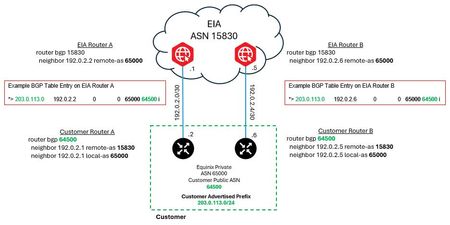
Welcome to the Equinix Community! We know you’re always looking for ways to maximize your connectivity, and sometimes technical limitations can be a hurdle. This post dives into a handy BGP feature called Local-AS that helps our Equinix Internet Access over Fabric (EIAoF) customers navigate a current setup requirement. We’ll provide a brief description of BGP Local-AS, a high-level overview of how it works in practice, and how it enables you to maintain your public Autonomous System Number (ASN) while at the same time using an Equinix-assigned private ASN currently required by EIAoF. What is BGP Local-AS? BGP Local-AS is a feature supported by most major network vendors that lets a BGP-speaking device appear to belong to an ASN different from its globally configured one. While it’s not part of the official BGP standard, it’s a powerful feature typically used during major network events like merging autonomous systems or transitioning to a new ASN. For EIAoF customers, it provides a clean, effective method to accommodate the current requirement to use a private ASN for your BGP session. The best part? Once EIAoF is updated to fully support public ASNs, you can simply remove the Local-AS configuration, or even leave it in place until you’re ready for a future transition! How BGP Local-AS Works with EIAoF The picture below provides only the relevant configuration snippets needed to convey the concept of using BGP Local-AS. It's presented using classic, non Address Family Cisco configuration syntax. An explanation of the relevant configuration variables and commands are explained below the picture. This short post is only intended to help readers understand how local-as can be used with EIAoF and is not intended to represent a complete BGP configuration nor an in-depth overview of local-as capabilities. Figure 1 – BGP Local-AS Example Dynamic Configuration Variables Equinix Assigned Primary IPv4 Peering Subnet: 192.0.2.0/30 Equinix Assigned Secondary IPv4 Peering Subnet: 192.0.2.4/30 Equinix Assigned Private ASN: 65000 Customer Public Autonomous System Number (ASN): 64500 Customer Public IPv4 Prefix: 203.0.113.0/24 A Side Key Configuration Command References router bgp 64500 ⬅️ Customer’s public ASN Customer router BGP ASN. This is the ASN BGP speakers use for peering (when not using local-as.) neighbor 192.0.2.1 remote-as 15830 ⬅️ EIA public ASN Defines the BGP connection to the EIA edge gateway router. neighbor 192.0.2.1 local-as 65000 ⬅️ Equinix Assigned Private ASN This makes the EIA edge gateway see this peer as belonging to the private AS 65000 instead of 64500. This router will also prepend AS 65000 to all updates sent to the EIA edge gateway. EIA Edge Gateway Router A *> 203.0.113.0 192.0.2.2 0 0 65000 64500 i The output above is an excerpt from the BGP table on the example EIA router A edge gateway. The fact this prefix appears in the BGP table with the associated ASNs confirms successful peering between EIA and the customer router using AS 65000. You can also see the AS-PATH of the prefix received lists the customer’s real AS, 64500, as the origination AS with the private ASN, 65000, prepended to it. When EIA advertises this prefix to external peers it will strip the private ASN, 65000, and prepend 15830 in its place. This will result in external peers seeing the 203.0.113.0/24 prefix with an AS-PATH of 15830 64500. Important Routing Security Requirement To ensure successful service provisioning with EIA, you must have the necessary Route Objects (RO) defined. Route Object (RO) When using an Equinix-assigned private ASN, you are required to create, or have created, a Route Object (RO) that matches your advertised prefix with the Equinix ASN (15830). If this RO does not exist your EIA service order will fail. Best Practice Recommendations It is recommended to also create a Route Origin Authorization (ROA) using RPKI for improved security and validation. We also strongly recommend that you ensure there is an RO that matches your public ASN to the prefix in addition to the one for ASN 15830. If you have any questions, please share in the comments below! 👇749Views4likes0Comments
PSA long delays in provisioning new services
Hi all, Is everyone else experiencing long delays asking for a new connection or changes to service. My own experience, has been since contact with the Equinix team, it has been 26 days, and from there we have been given a estimate of 2-4 weeks to provision a new connection.733Views0likes3CommentsIncrease bandwith on a connection
We currently have a copper bandwidth connection at the data center (in a cabient) and are looking to increase the available bandwidth. Could you assist with the steps invovled in ordering? From reading past forums does it involve ordering a new connection? Thanks for your expertise.689Views0likes1CommentEquinix DC – moving from copper to fiber + IP address ordering headaches
i everyone, We’re at an Equinix datacenter and moving from copper to fiber. And ordering some new IP addresses. Couple of things tripping me up: Ordering fiber vs copper cross connects through the portal isn’t super clear. Help desk isn't able to help Has anyone done a copper → fiber migration at Equinix recently? How did you order it (portal, ticket, account manager)? Cheers810Views0likes3CommentsEIA Just Got Easier: Experience Our New Simplified Flow
We heard you! We’ve streamlined the Equinix Internet Access (EIA) process to make it easier for you to order and manage your services. This initial phase is available exclusively for orders that do not require a signature. We’d love to hear what you think of the new process. Your input will help us make further enhancements to the user interface for everyone. We’re working hard to make the improvements you need and want. Please comment on the success page or share your feedback via ideas.284Views0likes0Comments
Equinix Internet Access - additional IPs
Hi team, When ordering Internet Access over fabric for a redundant connection type, how many sets of additional IPs are provided? For example is it just one set of additional IPs anywhere between /30 to /24? Or as it's a redundant pair do we get two sets of additional IPs e.g. additional IP range 1: anything from /30 to /24 additional IP range 2: anything from /30 to /24 ThanksSolved935Views1like6Comments
Terraform Module Equinix Internet Access. Does it exist?
I scavenged the terraform registry looking for a Equinix Internet Access Terraform module. ] I found an example of a connection to EIA.This is the only thing that comes up in the registry as EIA. https://github.com/equinix/terraform-equinix-fabric/tree/v0.22.0/examples/virtual-device-2-eia-connection But none that creates the EIA itself. Can anyone answer if this may or may not be supported in terraform and if so, what would the resource name be for it? The GUI terminology doesn't always translate one for one, so maybe I'm missing something.624Views0likes2CommentsHow to Order EIA with Fabric Using Provider-Independent IP Addresses
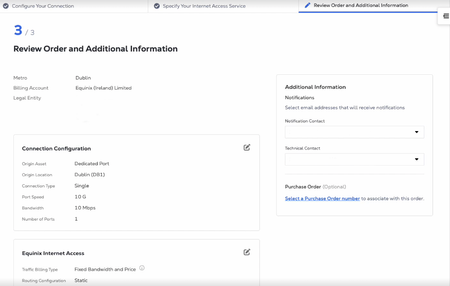
In this video, we'll show you how to order an Equinix Internet Access connection as a Virtual Connection within a Fabric Port using provider-independent IP addresses. This step-by-step guide takes you through the configuration of a new connection helping you to choose the correct bandwidth, port, and routing configuration. Create a new connection in the Fabric Portal: https://fabric.equinix.com/ 402Views0likes0Comments