api integrations
12 TopicsRunning Terraform from a restricted environment
When running Terraform to provision and manage Equinix Fabric, Metal, and Network Edge, you may want to run Terraform from a restricted environment. Network filtering ACLs will need a predictable set of IP ranges to permit. This discussion will help you discover the IP services, ports, and address ranges your Terraform runner environment will need access to. We'll also discuss alternative ways to run Terraform configuration. If your ACLs permit the Terraform runner environment outbound HTTPS (TCP 443) and responses, that would cover everything Terraform needs to start provisioning infrastructure on Equinix. We'll assume we don't have unrestricted access and dig in a little further. Upon running, `terraform init`, Terraform will attempt to use DNS (UDP/TCP 53) services and HTTPS services to download provider plugins, such as the Equinix Terraform provider. The default host for fetching these plugins is registry.terraform.io, managed by Hashicorp. This is the defacto hub for public providers and published Terraform modules, although you may run your own local registry service. DNS for the Terraform registry points to CloudFront, a CDN whose addresses may change. If this presents a problem, there are options to download (or mirror) the necessary plugins in advance and use locally distributed copies. https://developer.hashicorp.com/terraform/cli/plugins Similarly, the DNS service for api.equinix.com, the one base domain that the Terraform Equinix provider will need for API access, resolves to Akamai, another CDN whose addresses may change or depend on where the request originates. As a Terraform configuration grows, you'll likely want to enable SSH access to the Metal and NE nodes being provisioned to automate OS provisioning. The SSH addresses will vary depending on the Metro where services are deployed. One way to ensure that the addresses are predictable in Metal is to provision the servers using Elastic IP addresses. A good follow-up question to this discussion is which ranges are assigned to NE devices and whether these IP addresses can be drawn from a predefined pool like Metal's Elastic IP Addresses. Terraform configurations typically include resources from multiple cloud providers. The node where the configuration is run would need to permit access to the APIs of these other providers. We'll leave the network filters needed by provisioned nodes to another discussion. Depending on your needs, cloud service providers offer managed services for Terraform or OpenTofu (a fork of Terraform persisting the original open-source license). These services can run your Terraform configuration predictably and reliably from a central location. Hashicorp provides the HCP service. https://developer.hashicorp.com/terraform/cloud-docs/run/run-environment Alternatives include: https://spacelift.io/ https://upbound.io https://www.env0.com/ https://www.scalr.com/ You can run similar CI/CD Terraform configuration control planes in your own backend with opensource tools such as: https://argoproj.github.io/cd/ https://www.crossplane.io/ https://docs.tofutf.io/ These SaaS providers or local solutions will also need access to the cloud provider APIs and nodes. With these providers you have full control of the configuration that is run and you can work these into a GitOps workflow. There are even more alternatives outside of the Terraform ecosystem. However, the Terraform ecosystem is your best option for the richest IaC integration experience with Equinix digital services. Equinix provides several Terraform modules to make it easy to get started. That extended ecosystem includes IaC tools that take advantage of the robust Equinix Terraform provider. These tools include Pulumi and Crossplane. TLDR; You'll want to expose select DNS, HTTPS, and SSH access from your Terraform runners. What alternative deployment strategies did I miss? What other network restrictions should be considered?805Views3likes0CommentsWhat's the difference between Playground, Sandbox, and Production?
You might be deploying on Network Edge today to run through Charles_Randall's tutorial. While reading up on Network Edge at Developer Platform, then perhaps you're thinking "what's the difference between Playground, Sandbox, and Production?". In short: Playground is a test environment to test Equinix APIs, using static data without integrating within the actual API. Sandbox is a mock test environment to test Equinix APIs, using synthetic data (not production data) to integrate with Equinix APIs before moving to Production. Production is the live environment.4.4KViews2likes0CommentsWhat's the latest, easiest way to order Precision Time services?
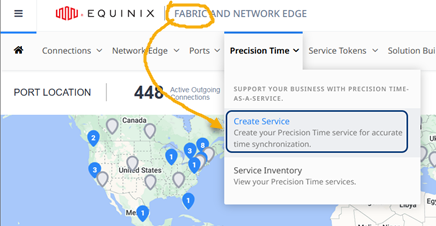
Just announced: If you have a Fabric login and billing account, you can order Equinix Precision Time through the Fabric Portal. Just follow the Quick Connect prompts, and with a few clicks, your new time service is provisioned and ready to go. Both PTP and NTP protocols are supported, for both Standard and Enterprise tiers. Want more information? See the steps in Order Precision Time with Quick Connect.4.6KViews1like0CommentsNew Fabric APIs expand usablity
Connect Using Service Token - Equinix APIs use OAuth 2.0 protocol to authenticate the requests you make to API endpoints. In order to interact with Equinix APIs, you need a bearer acess token. Bearer determines the type of authentication scheme and is a part of the OAuth 2.0 protocol. https://developer.equinix.com/docs6.6KViews1like1Comment