Upcoming Migration: Community.Equinix.com will be read-only from April 7–16 while we move to our new platform. Learn more.
User Profile

WendyT
Equinix Employee
Joined 3 years ago


User Widgets
Contributions
Network Edge Interface Statistics
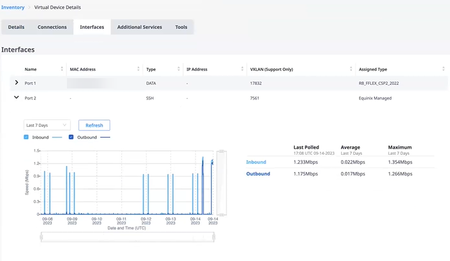
Now you can monitor your Network Edge device utilization traffic by accessing your device details. In your Virtual Device Inventory, click on the device you want to monitor. In the Device Details, click the Interfaces tab. Expand the arrow next to the port you want to monitor and a graph will display showing Inbound and Outbound traffic for the last 7 days. Refresh the graph by clicking Refresh. Change the duration using the drop-down. Choose Last 7 days or Last 24 hours.2.5KViews3likes0CommentsHave you used Network Edge Solution Builder?
Have you used Solution Builder to create a design that is so spectacular, you can't wait to share it with your colleagues? Check out the Sharing Your Solution section on the Solution Builder page in our documentation to learn how to share your designs.5.8KViews2likes1Comment